
01
Updates & backups
WordPress, theme and plugin updates, checked before and after, with a daily off-site backup behind every change.
- Core, theme and plugin updates
- Daily backups stored off-site on AWS
- Restore from backup when needed
WordPress maintenance from a developer, not a robot: checked updates, daily off-site backups, security scans, uptime checks every 5 minutes and real fixes. From $25 a month, cancel any time.
From $25/moMonth to month, no lock-inDeveloper hours from $99
99.92%uptime, checked every 5 minutes
576msmedian response time
Straight from the monitoring behind our WordPress maintenance plans, for the 11 live sites it watches, 28 to 31 October 2026.
One incident in four days, fixed in 5 minutes. The daily vulnerability scans in our WordPress maintenance flagged critical plugin holes, rated 9.8 out of 10, on sites we look after.
This is the routine behind our WordPress maintenance. We run it right now on the stores, clinics, coaches and nonprofits we look after.
From outside your server, with an alert straight to us if the site stops responding.
Files and database, stored away from your hosting so a server problem cannot take them too.
Malware, blacklists and known security holes in your plugins, themes and WordPress.
Every broken link and your speed scores. Reported on Host & Secure, fixed on Care and Growth.
WordPress, plugins and theme, each round after a fresh backup and checked on the live site. Weekly on Care and Growth (Growth on a staging site first), monthly on Host & Secure.
What we did, what we fixed and what comes next, in words you can read. On every plan.
Every plan covers the three things that keep a WordPress site healthy. You get on with the business; we tell you what we did.
WordPress, theme and plugin updates, checked before and after, with a daily off-site backup behind every change.
WordPress maintenance that watches every site every 5 minutes and scans it every day, so problems are caught before your customers see them.
Real WordPress maintenance includes people: a developer on hand every month for the edits, fixes and small features on your list.
Our WordPress maintenance starts with a health check, so the plan works from day one instead of guessing.
Your WordPress maintenance starts with a check of updates, security, backups and speed, so we know what normal looks like.
Monitoring and daily off-site backups switched on, and a security and speed baseline taken. Any critical fix found now is handled by your plan.
Uptime every 5 minutes and malware and vulnerability scans every day, with WordPress maintenance alerts straight to us.
Tested updates on your plan's schedule, fixes from your developer hours, and a monthly report in plain words.
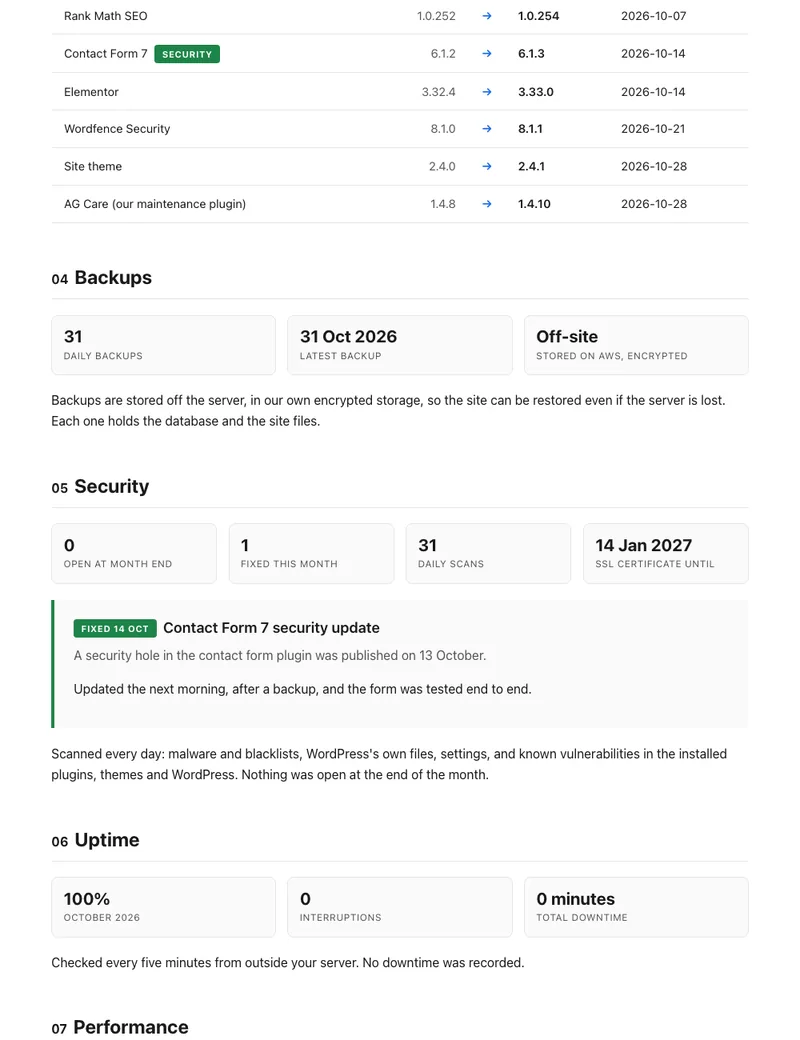
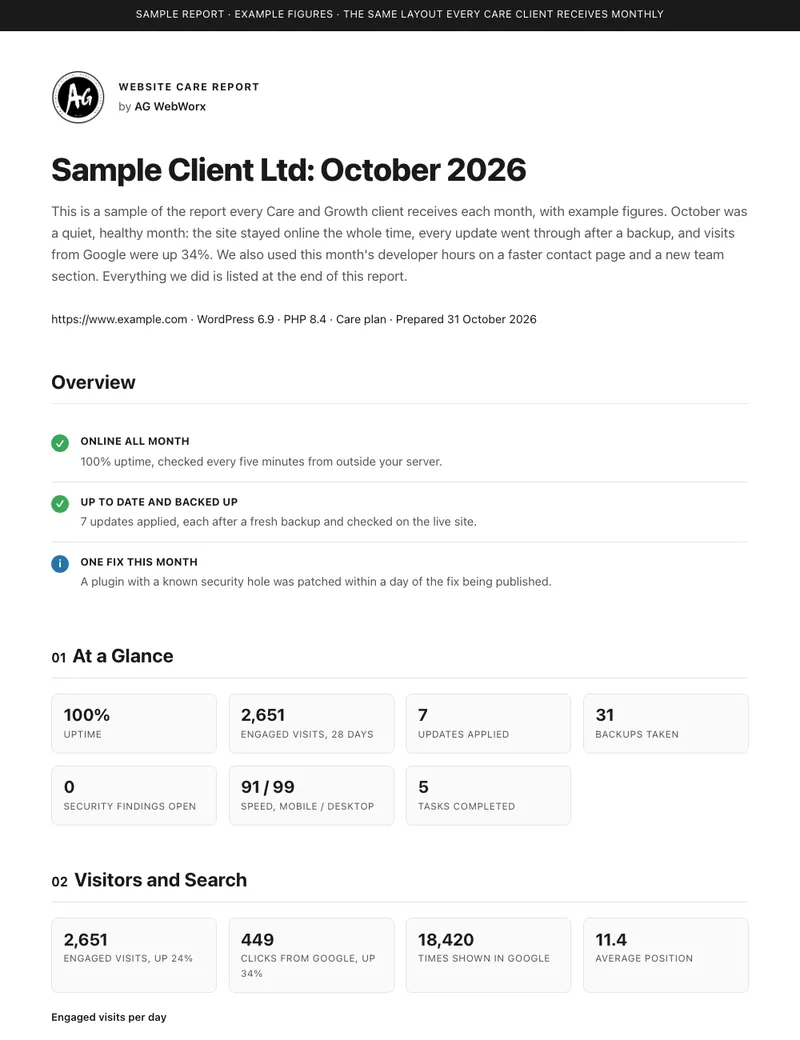
Every plan comes with a WordPress maintenance report each month, in plain words: short on Host & Secure, standard on Care and full on Growth. This full sample uses example figures in the exact layout our clients receive.
PDF, 9 sections, 600 KB.
 Sample report
Pick the WordPress maintenance plan that fits how often your site changes. Developer hours reset every month, yearly billing saves 15%, and you can cancel any time.
For sites that just need to stay up and safe, on our hosting or yours.
For business sites that change often and can’t go down.
For stores and busy sites that ship new features every month.
Every plan starts the same way. In the first week we set up monitoring and backups and take a security and speed baseline. A critical fix found then, like a hacked file or an expired SSL, is quoted on Host & Secure, comes from your developer hours on Care and is included on Growth.
What each WordPress maintenance plan includes and how often, in one table.
| Included | Host & Secure$25/mo | Care$99/mo | Growth$300/mo |
|---|---|---|---|
| Hosting | Ours or yours | Ours or yours | Ours or yours |
| Uptime checks every 5 minutes, with alerts | Included | Included | Included |
| Daily off-site backups | Included | Included | Included |
| Daily security and vulnerability scan | Included | Included | Included |
| Weekly broken link and speed check | Included | Included | Included |
| WordPress, plugin and theme updates, after a fresh backup | Monthly | Weekly | Weekly, on staging first |
| Known security holes patched | Next update round | Within 48 hours | Within 48 hours |
| Broken links and speed issues | Reported | Fixed from your hours | Reported and fixed |
| Restore test from a backup, every quarter | No | Included | Included |
| WooCommerce checkout tested after every update | No | No | Included |
| Staging site for your changes | No | No | Included |
| Developer hours a month | None | 2 | 8 |
| Monthly care report | Short | Standard | Full |
| Quarterly review | None | Written note | 30-minute call |
| Setup and baseline in the first week | Included | Included | Included |
| Critical fix found at onboarding | Quoted | From your hours | Included |
| Reply time | 2 business days | Next business day | Same day |
Monthly care report. Short: uptime, backups and security. Standard adds updates, speed, developer hours used and the work done. Full adds visitors, Google search and the plan ahead.
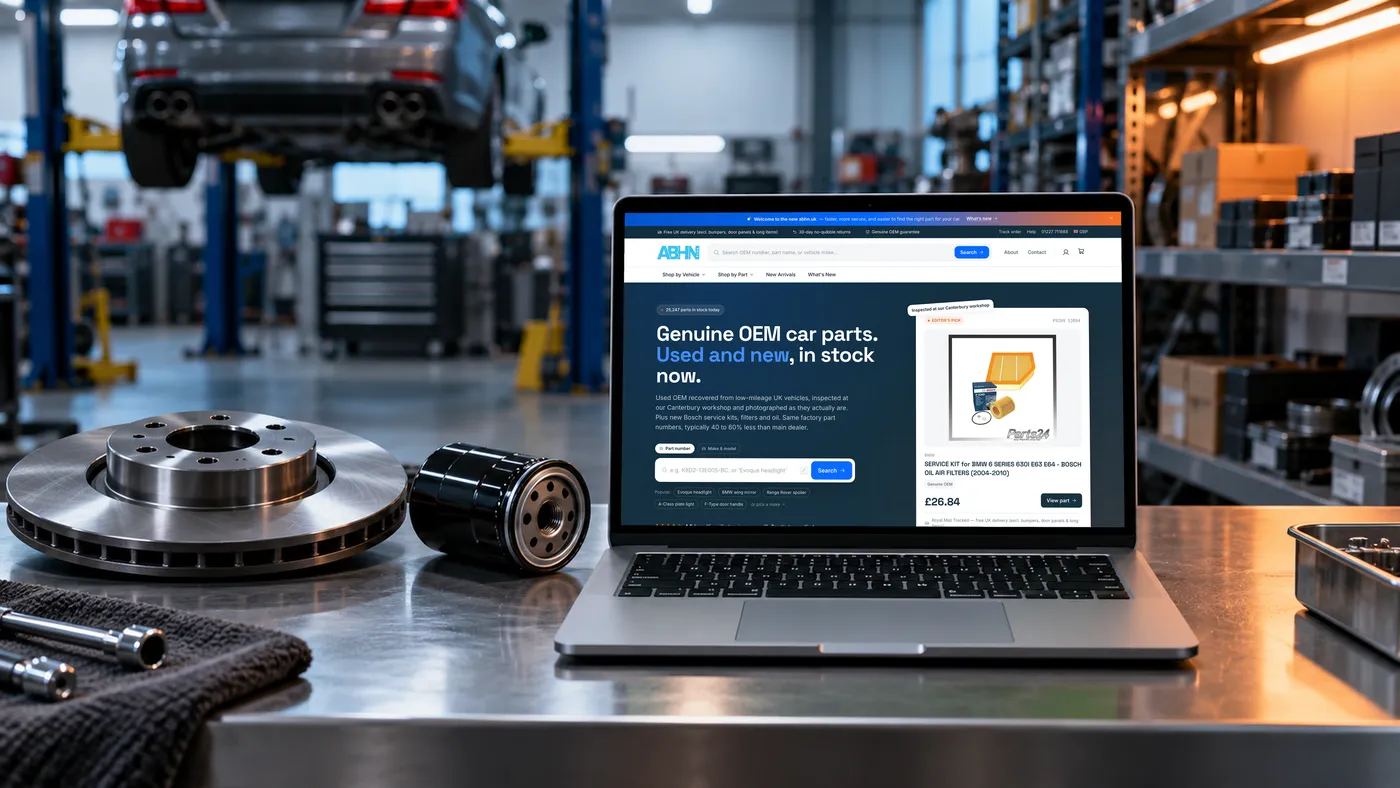
A 25,000-part store, an advisory firm and a Lions district: three of the live sites on our WordPress maintenance and monitoring today.
A UK car-parts store rebuilt into a fast multi-vendor marketplace, with new features shipped every month.
A landing-page-led website for a Toronto operations advisory, set up to be found on Google and to book strategy calls.

A new site for a new Lion Year, rebuilt around the incoming District Governor’s theme.

“Alipio quickly identified my issue, fixed it and then offered me advice on what I could do better on the site.”
“One of the most talented web designers and developers I've worked with. Creative, efficient, and a real problem-solver.”
“He's joining our team long-term and we're delighted we found him. Really skilled with Elementor and everything you need to build a great WordPress site.”
What site care actually involves, what it protects you from and what to expect, in plain words.
WordPress maintenance is the ongoing work that keeps a WordPress site safe, fast and online after launch. It covers updates to WordPress, the theme and every plugin, daily backups, security scans, uptime monitoring and the small fixes that pile up over time.
A good WordPress maintenance plan does that work for you every month and tells you what changed. Ours start at $25 a month, and every plan is month to month.
Most hacked WordPress sites are not hacked through WordPress itself. They are hacked through a plugin or theme with a known security hole that nobody updated. In the four days of monitoring shown on this page, our daily vulnerability scans flagged critical plugin holes, rated 9.8 out of 10, on sites we look after.
That is why our WordPress maintenance patches known security holes within 48 hours on the Care and Growth plans, instead of waiting for the next monthly update round.
A backup only matters on the day you need it. As part of WordPress maintenance we back up files and the database every day and store them off-site on AWS, away from your hosting, so a server problem cannot take the backups down with the site.
Before updates, a fresh backup runs. If an update breaks something, we roll back from that backup and fix the cause, usually before anyone notices. On Care and Growth we also restore the site from a backup every quarter, to prove the backups work.
If your site goes down at 2am, you should not find out from a customer. Our monitoring checks every site every 5 minutes, all day, every day, and alerts us the moment one stops responding.
Across the 11 live sites we monitor, that came to 8,994 checks and 99.92% uptime in four days. The one incident in that time was fixed in 5 minutes.
Every plan includes a daily malware, blacklist and vulnerability scan. The malware scan looks for injected code and spam pages, the blacklist check makes sure Google and browsers are not warning visitors away, and the vulnerability scan matches your plugins against newly published security holes.
If a site on the Care or Growth plan is ever hacked, cleanup and a restore from a clean backup are included. We also find out how it happened and close the gap so it does not happen again.
A problem that was already there when you join, like a hacked file or an expired SSL found at onboarding, is handled by plan: quoted on Host & Secure, fixed from your developer hours on Care and included on Growth.
Sites slow down over time as plugins, images and tracking scripts pile up, which is why speed belongs in WordPress maintenance. Google measures that through Core Web Vitals, and slow pages lose both rankings and customers.
Every WordPress maintenance plan includes a weekly broken link and speed check. On Host & Secure we report what we find. On Care we fix it from your developer hours, and on Growth the fixes are included.
A store cannot afford a broken checkout after an update, so WooCommerce maintenance needs more than a click on Update all. Store plugins also update often and depend on each other, so a careless update round can stop orders without any error on the homepage.
Our Growth plan is built for stores: changes go to a staging site first, and the checkout is tested after every update so orders keep coming in.
Most sites have a list of small jobs: a new section, a form that needs another field, a plugin to swap, a page that looks off on phones. The Care plan includes 2 WordPress developer hours a month for those jobs and Growth includes 8.
Hours reset every month. You send the request, we do it, and it shows up in your monthly WordPress maintenance report.
The Host & Secure plan is $25 a month either way: with our fast cloud hosting and free SSL included, or as WordPress maintenance only on the host you already have. It suits sites that rarely change.
Already happy with your host? Every plan works on any good host, or we move the site to our cloud hosting for you as part of onboarding, at no extra cost.
You can maintain a WordPress site yourself: log in every week, run the updates, check the site, keep an eye on backups and read the security news. Many owners start that way and stop when the business gets busy, which is usually when an outdated plugin gets exploited.
A WordPress maintenance plan costs less than an hour of emergency repair work each month, and the checks happen whether or not you remember them.
Every plan includes uptime checks every 5 minutes with alerts, daily off-site backups, a daily security and vulnerability scan, a weekly broken link and speed check, updates after a fresh backup and a monthly report. Host & Secure updates monthly. Care updates weekly, patches known security holes within 48 hours, tests a restore every quarter and includes 2 developer hours a month. Growth adds 8 developer hours, your own staging site, WooCommerce checkout testing after every update, a full monthly report and a quarterly 30-minute call.
Host & Secure is $25 a month, Care is $99 a month and Growth is $300 a month. Paying yearly saves 15%. There are no setup fees for sites in good shape and no lock-in contracts.
No. WordPress maintenance plans run month to month and you can change or cancel any time. Your site, your backups and every login stay yours.
Yes. Most WordPress maintenance clients come to us with an existing site. We start with a health check so we know the site before we change anything.
A fresh backup runs before every update round, and on Growth updates are tested on a staging site first. If something still breaks on the live site, we fix it or roll it back from the backup, usually before anyone notices.
Monthly on Host & Secure, weekly on Care and Growth, always after a fresh backup. On Growth they are tested on a staging site first. Known security holes are patched within 48 hours on Care and Growth, without waiting for the next update round. On Host & Secure they are patched in the next monthly update round.
Files and database are backed up every day and stored off-site on AWS, away from your hosting. If the server has a problem, the backup is still safe.
On Care and Growth, malware cleanup and a restore from a clean backup are included at no extra cost. We also find how it happened and close the gap.
We set up monitoring and backups and take a security and speed baseline, so we know what normal looks like. If we find a critical problem, like a hacked file or an expired SSL, the fix is quoted on Host & Secure, comes from your developer hours on Care and is included on Growth.
Yes. On Care and Growth we restore the site from a backup every quarter to prove it works. The same quarter ends with a review: a written note on Care and a 30-minute call on Growth.
Our monitoring checks every site every 5 minutes, all day, every day. If a site goes down we are alerted straight away and start fixing it. Across the client sites we monitor, the one incident in the last few days was fixed in 5 minutes.
It is your choice, and the price is the same. Host & Secure is $25 a month with our fast cloud hosting and free SSL included, or $25 a month as care only on your current host. Care and Growth work the same way: keep your host, or we move the site to our cloud hosting for you.
Edits, fixes, new sections, small features, plugin changes or speed work. Care includes 2 hours a month and Growth includes 8. Hours reset every month.
Yes. Our Growth WordPress maintenance plan is built for stores: a staging site for safe changes, and the checkout tested after every update so orders keep coming in.
Every plan includes a weekly broken link and speed check. On Host & Secure we report what we find. On Care we fix it from your developer hours, and on Growth the fixes are included.
Every plan gets one, in plain words. Host & Secure gets a short report on uptime, backups and security. Care gets the standard report, which adds updates, speed, developer hours used and the work done. Growth gets the full report, which adds visitors, Google search and the plan ahead.
Within 2 business days on Host & Secure, the next business day on Care, and the same day on Growth. Downtime alerts are handled straight away on every plan.
Alipio Gabriel, a Top Rated Plus WordPress developer on Upwork, and our in-house development team do all WordPress maintenance work. You deal with the same people every month, not a ticket queue.
Yes. Many clients hire us through Upwork for the added payment protection, either through Alipio's Top Rated Plus profile or the AG WebWorx agency. Same team, same pricing.



Alipio Gabriel, founder and lead developer · with Kenneth N. and Irish E.’s SEO team
Tell us about your site and pick a WordPress maintenance plan. We start with a health check and have backups and monitoring running within a week.